Client Pending Items
Instructions
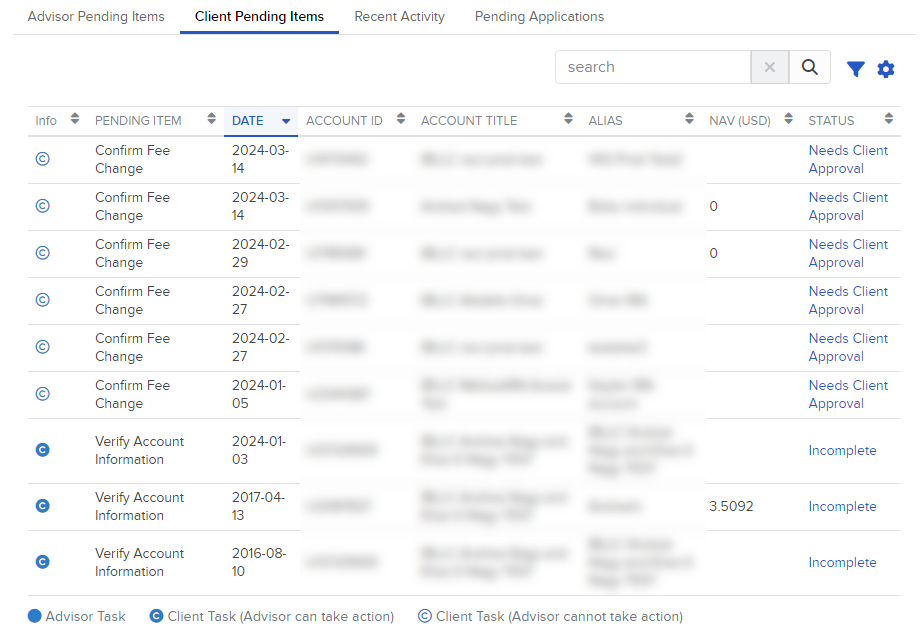
The Client Pending Items section contains a list of records you can view, sort and search. Sort by clicking any column heading (Info, Pending Item, Date, Account ID, Account Title, Alias, NAV, Status or Action). Use the search bar to quickly locate information.
Use the Filter function to refine your view by Type, Task Actionable By and Docusign Task.
Click the Configure (gear) icon to view or hide columns such as Account Title, Alias, NAV, and Status.
-
Click Dashboard in the top left corner and select the Client Pending Items tab
By default, ten records are displayed, but you can change this to 25, 50, or 100. Click items in the Status column for more information.
 Indicator Definitions
Indicators on the items allow you to quickly identify the different types of items. The key is at the bottom of the section.
-
Advisor Task – your action items (e.g. print the Fee Change form, manage application related items, etc.)
-
Client Task (Advisor can take action) – items you can complete on behalf of clients.
-
Client Task (Advisor cannot take action) – items you cannot complete on behalf of clients.
-
DocuSign Envelope has been sent - Docusign tasks that require completion by clients.
Removing Pending Items
To remove items you cannot complete, select the box at left and click the trash icon.
Removals are user-specific: items removed by user A will still be visible to user B.
Items you have removed from your list will remain visible to clients so they can address them.
Note: The option to remove pending items appears only for Advisors enrolled in Streamlined Authorizations.
Alert a Client
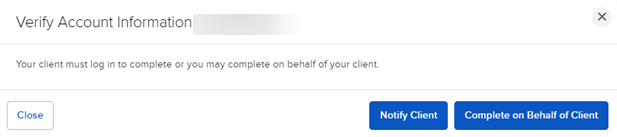
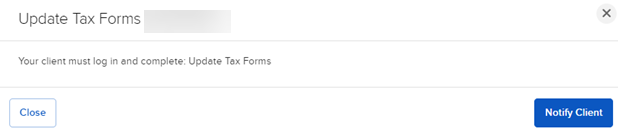
When you click the Incomplete link in the Status column, a pop-up window will list possible actions you can take, including sending a notification to the client to complete the task (see example below).
-
For Client Task (Advisor can take action) – you can either complete the task on behalf of the client or send a notification to the client to complete it.
-
For Client Task (Advisor cannot take action) – you can send a notification to the client to complete it.
-
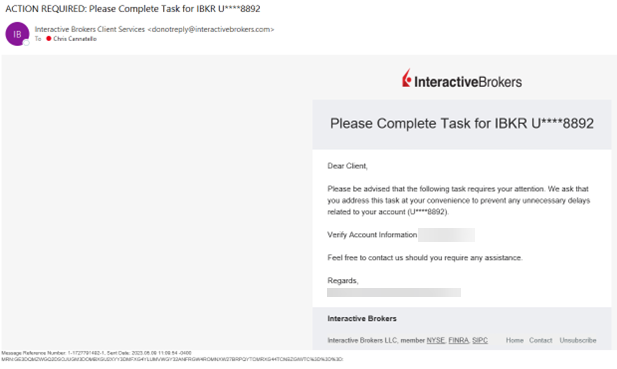
The client will receive an automated notification alerting them to the pending task.