Close Positions
Instructions
Elect to Close Positions by taking the steps outlined below.
-
Tap the
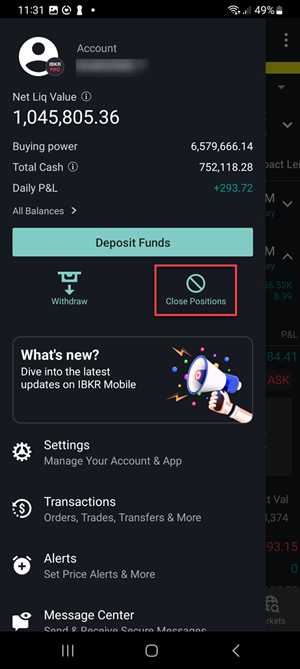
-
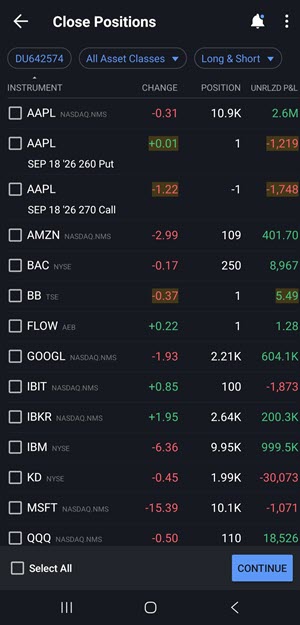
Your positions will be listed on the screen. If you only want to close certain positions, select the applicable positions and click Continue.
You may additionally sort these positions by Asset Class or Long & Short:
-
Asset Class: Choose between All Asset Classes, Stocks, Options, Futures, Futures Options, Warrants or Bonds.
-
Long & Short: Choose between Long & Short, Short, or Long positions.
-
-
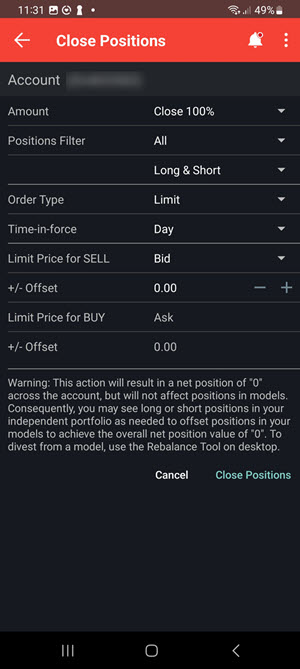
Set the additional order parameters and tap Close Positions. These order parameters have been listed below.
| Setting | Description |
|---|---|
| Amount | Choose from 100%, 75%, 50% or 25% of your selected positions. Percentages are applied to each position. |
| Positions |
The list of your closing positions will populate. |
| Order Type | Define the order type to use for the Close All action. |
|
Time-in-Force |
Set the time-in-force for the Close All order. |
|
Limit Price for SELL |
Set the reference limit price for sell orders in the Close All action. |
|
+/- Offset |
Define an offset to be used with the Limit Price for SELL. |
|
Limit Price for BUY |
Set the reference limit price for buy orders in the Close All action. |
|
+/- Offset |
Define an offset to be used with the Limit Price for BUY. |
 Limitations
-
Advisor Model accounts are not supported. If a user manages a Model, they will not see it as an option in the account selector for this screen — only "All accounts" or FA Groups.
-
Combo positions are always shown as individual legs, never grouped, even with "Display Combo Positions" turned on. Combos are intentionally excluded from bulk close grouping.
-
The Preview screen shows the full position count, not an estimated share amount for a percentage-based close. If a user selects "close 50%," the preview still shows the total position rather than an approximate number of shares, because the exact amount is only determined when the order executes.
-
Partitioned accounts close at the whole-account level. A partitioned account's bulk close can close positions across multiple models (not just the user's Independent/Core model), which differs from a single-position close via Quote Details.