Fundamentals
Instructions
The Fundamentals Explorer is designed to help you better gauge the fundamental value of an asset, the explorer includes Company Profile, Themes, Key Ratios, Dividends, IMPACT, Financials, Analyst Ratings, Analyst Forecasts, News, Social Sentiment, Securities Lending, ESG, Competitors and more.
-
Tap a financial instrument from any tool (Portfolio, Watchlist, Scanner, etc) to display mini Quote Details.
-
Tap again to view the full Quote Details screen.
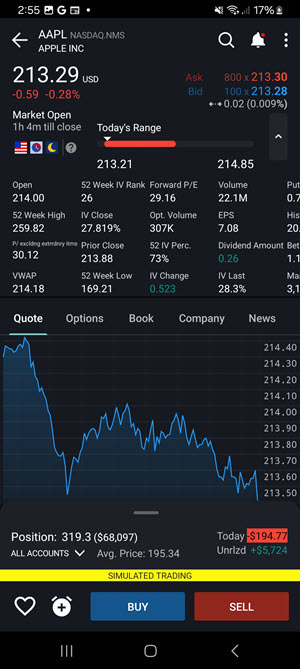
-
Scroll down on the Quote screen and click the arrow icon on any of the 'Fundamental' widgets (like Dividends or Analyst Ratings).
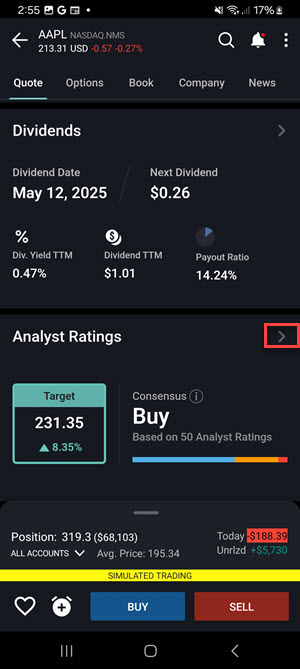
-
The Fundamentals screen will populate.
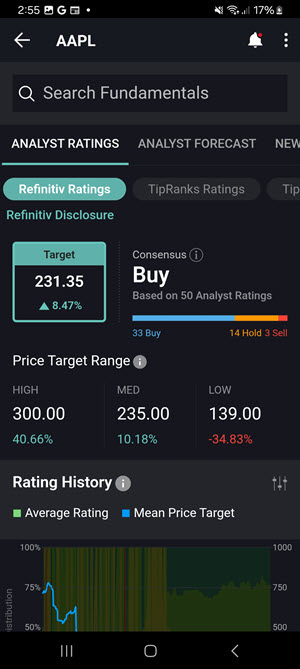
-
Scroll through the tabs at the top of the page to view Company Profile, Themes, Key Ratios, Dividends, IMPACT, Financials, Analyst Ratings, Analyst Forecasts, News, Social Sentiment, Securities Lending, ESG, Competitors and more.