Contact - Third-Party Reports
Instructions
This section allows you to download statements into any one of the following softwares:
- Quicken Web Connect
- GainsKeeper
- Tradelog
- Microsoft Money
- Portfolio Center/Morningstar
- Captools (Legacy)
- Plaid
In addition, the following downloads are available upon request:
- Daily Captools Downloads - Available for clients upon request. Send your request to enable Captools downloads
- Daily PortfolioCenter®/MorningstarDownloads for Advisors (for advisor accounts only).
PortfolioCenter is a product of Schwab Performance Technologies, a subsidiary of The Charles Schwab Corporation.
If you are downloading your statements for use in a proprietary program that requires a set format, use Activity Flex Queries instead of Activity Downloads.
To download statements to Third-Party Software:
-
From the Contact page, click Menu in the top left corner > Contacts & Accounts
-
Click the contact's name to open the Contact Information page.
-
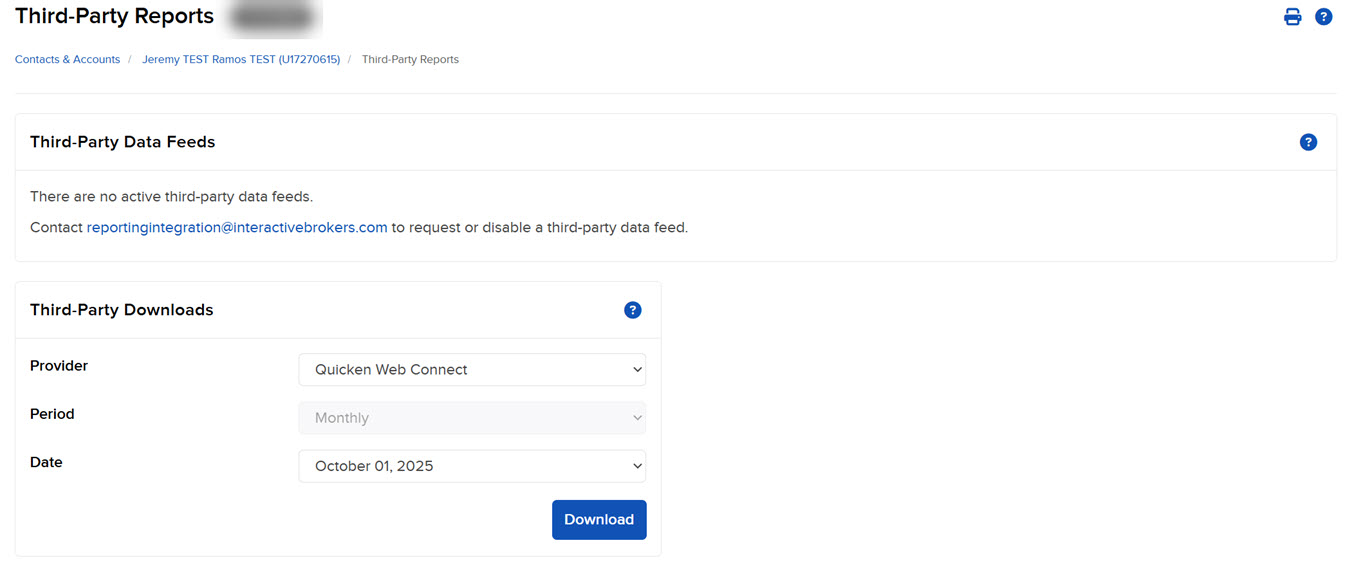
From the Contact page, click Menu in the top left corner > Select Reporting > Third-Party Reports.
-
Select the Period and Date using the drop-downs provided.
-
Click Download.
-
Open the generated report with the appropriate application, or download it to your computer.