Dashboard - Home
Instructions
The Home Page provides a single point of access to quickly and easily manage student information and many components of each account.
-
Click Dashboard in the top left corner.
-
The home menu opens
Viewing Rankings and Performance Data
Professors can view top performers and rankings/performance data for all students. Students, for privacy purposes, can only view their own individual performance.
By default, rankings are based on Total Account Value (NAV) and Net P&L. Because student accounts may not start with identical capital, professors are encouraged to also reference % Return (available via Statements or Flex Queries) for a fairer, size-adjusted comparison across the class.
-
Best Practice: Professors typically share class-wide rankings with students through Blackboard or another preferred communication method, since students cannot view this data directly in the platform.
This includes:
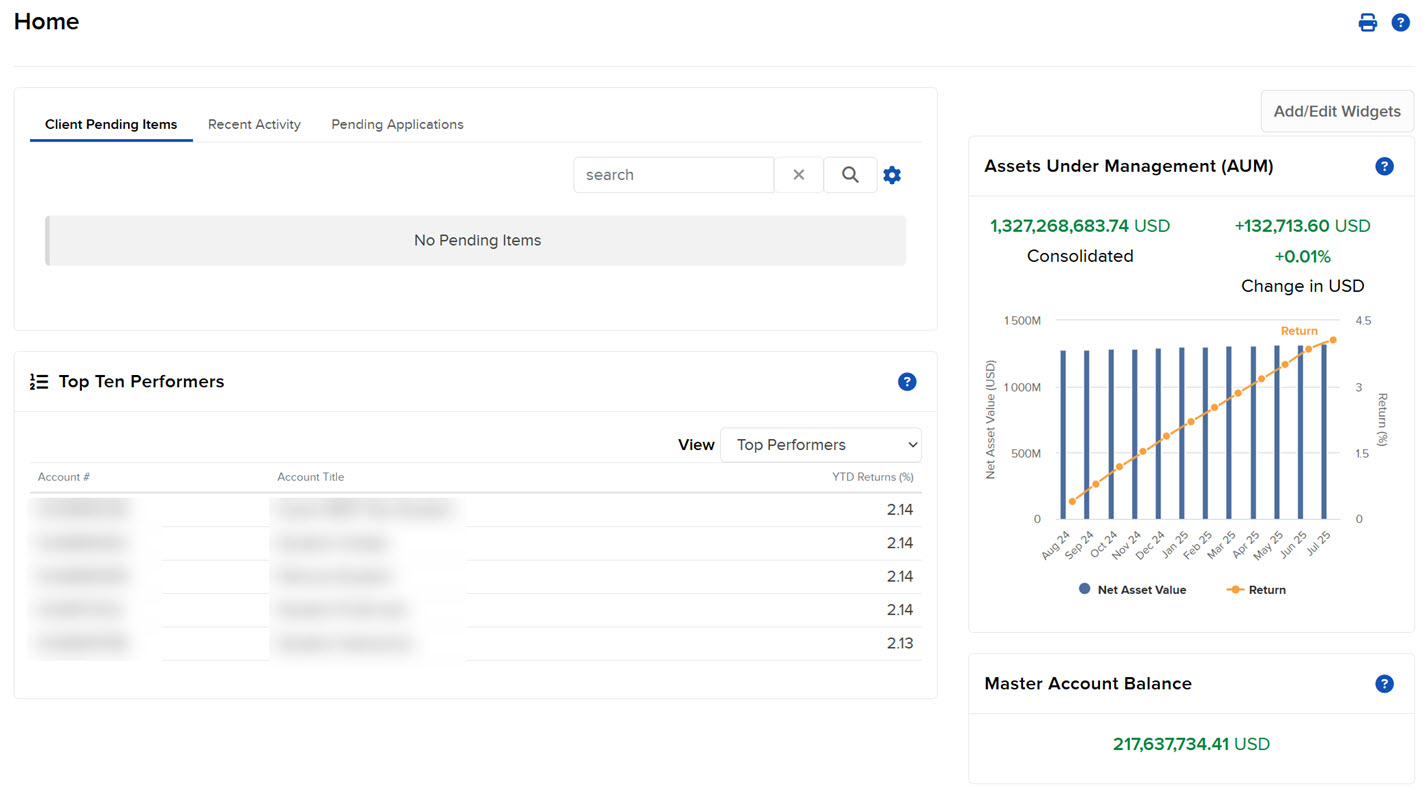
- Client Pending Items: A list of records that you can sort and search.
- Recent Activity: All recent account application activity during the past five days in all studentaccounts.
- Add/Edit Widgets: Allows users to hide, relocate and customize the panel on the homepage.
- Assets Under Management: The consolidated NAV and YTD return of your AUM.
- Master Account Balance: The total balance in your master account.
- Top Ten Performers: Displays ten clients ranked by their year-to-date (YTD) performance.